How it works
A learning engine built around one idea: meet each child exactly where they are, and never make practice feel like a test. Here's everything it does, in full.
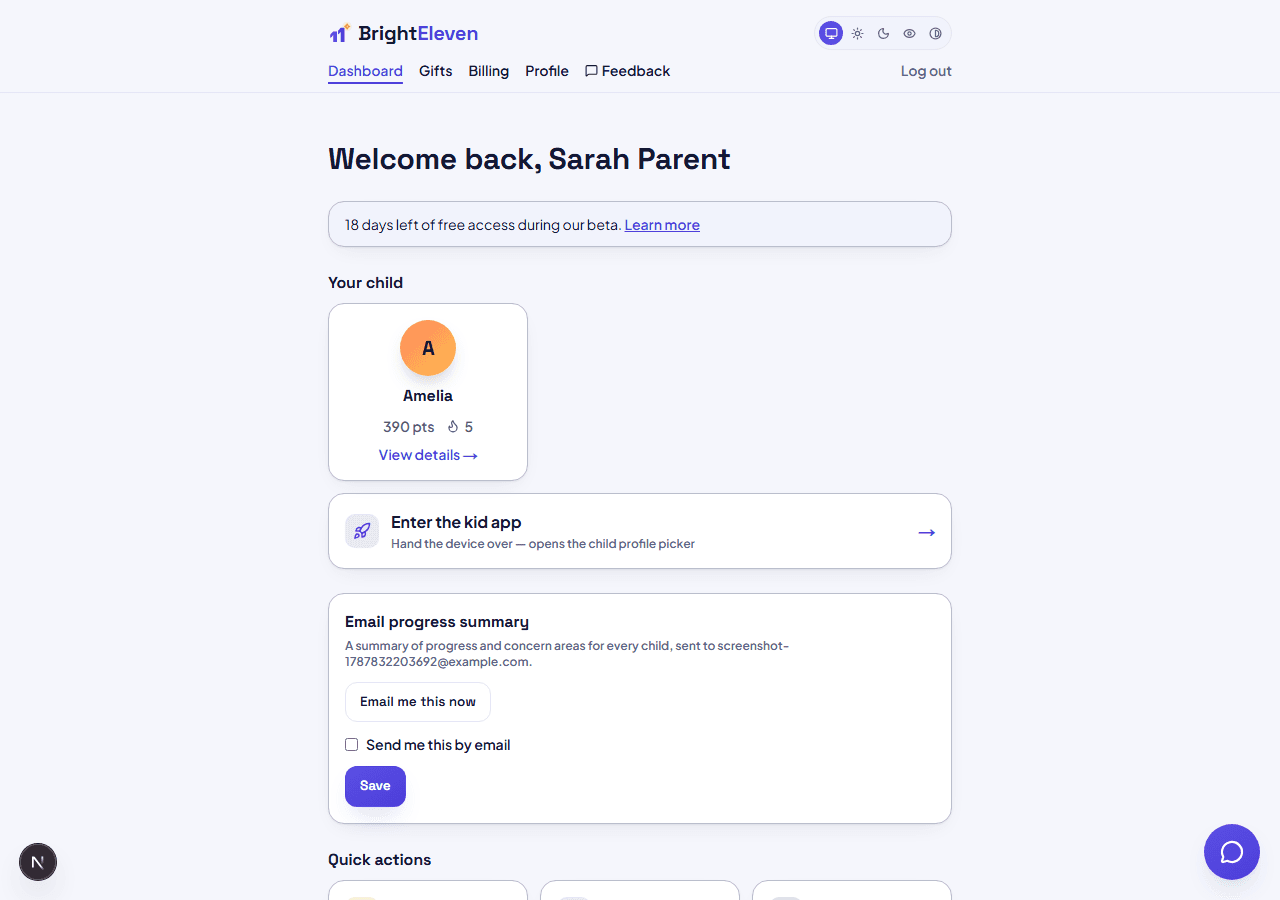
1. Add your child
From your parent dashboard, add a profile with just a first name and a 4-digit PIN - that PIN is what they use to open their own space. Up to 3 children per account.
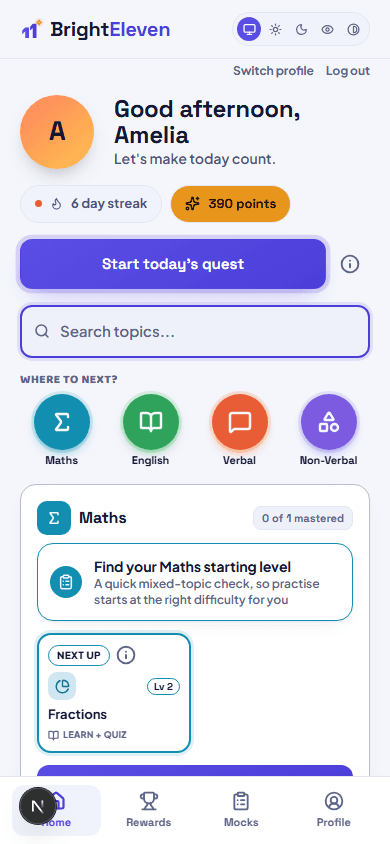
2. Hand over the device
Their home screen shows a Daily Quest button, streak, points, and every subject - tap one to start, or let Daily Quest pick a mix for them.
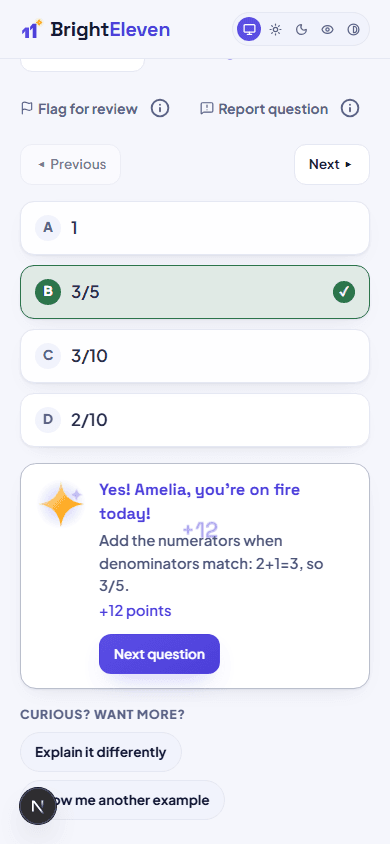
3. Practice adapts automatically
Questions get easier or harder based on real performance - no manual level-setting. Read-aloud, hints, and flagging a tricky question are always one tap away.
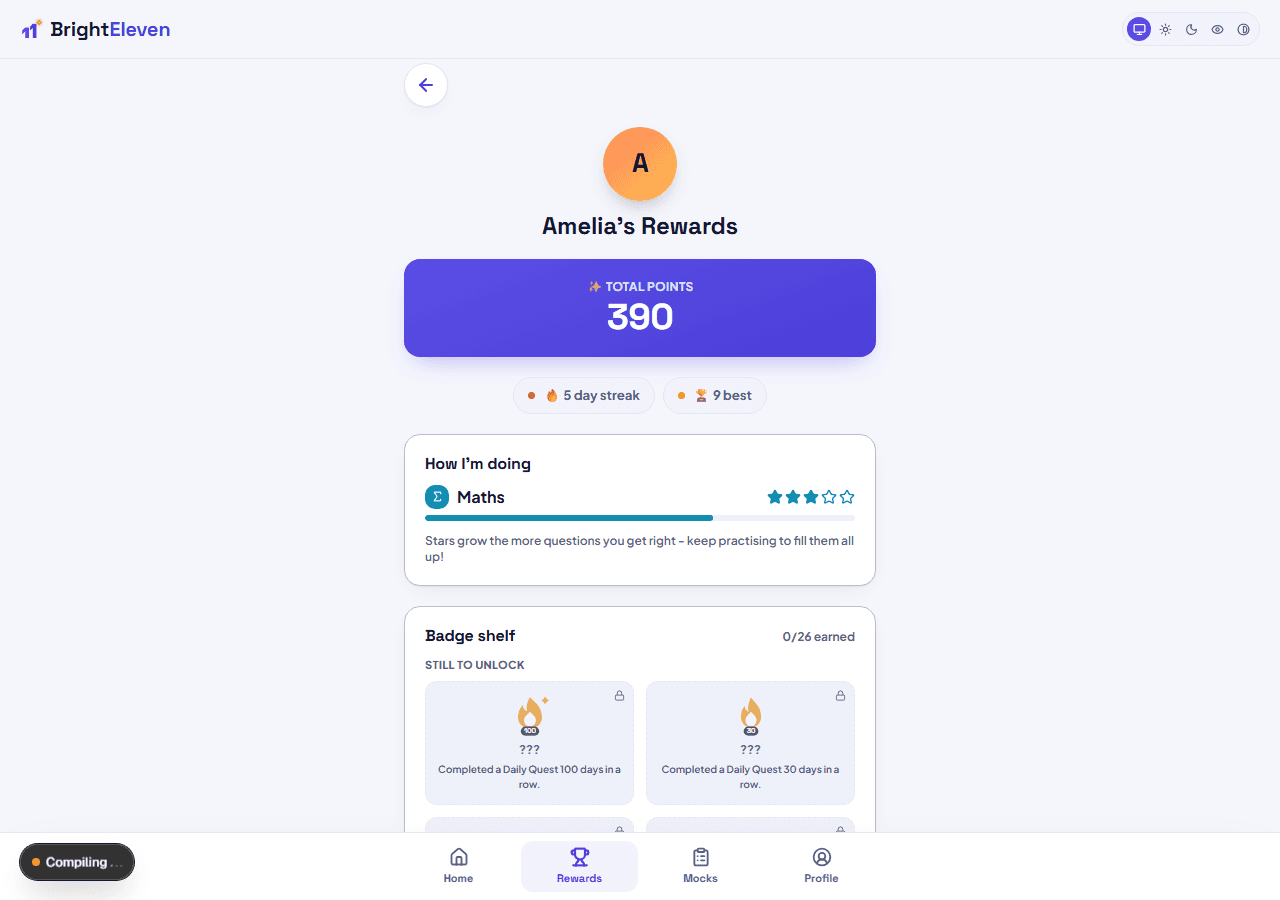
4. Rewards, not pressure
Points, streaks, and badges celebrate progress - there are no leaderboards and no comparisons with other children, ever.
The learning engine, step by step
Placement, adaptive difficulty, spaced re-teaching, Daily Quest, and mock exams - the mechanics behind every session.
Discover your superpowers
A friendly 25-question placement quiz sets your child's starting point in each subject - framed as a quest, never scored or shown as a percentage. Free Previous/Next navigation, a personal flag-for-review, and it saves as they go, so closing and reopening mid-quiz picks up exactly where they left off.
Learn → Practise → Quiz, per topic
A short interactive lesson introduces the rule and a worked example, with a "skip to practise" option for anyone who already knows it. Then untimed practice with instant feedback and hints. Practice sessions default to 10 questions, and a child can switch to 20 or 30 in Settings.
Difficulty adapts automatically, in 5 levels
We track the last 10 answers at your child's current level. Score 8 or more correct out of those 10 and it promotes a level, with a celebration. Slip to 4 or fewer and it quietly eases off a level - no negative messaging, the questions just get friendlier. A practice session itself is a considered mix: 60% questions at the current level, 20% one level easier to build confidence, 10% one level harder as a stretch, and 10% Fix-It re-tests.
Wrong answers come back, gently
Every wrong answer joins the Fix-It queue: a same-session recap, then re-tests at 2, 7, and 21 days using a different variant of the same skill, and mastering it at day 21 clears it for good. Blended unlabelled into normal sessions - never more than 3 per session or 10% of a practice set, and never flagged as remedial.
One button owns the home screen
Daily Quest builds a cross-subject session automatically: a warm-up question, the topics that need the most attention across all four subjects, one stretch question, and a couple of Fix-It re-tests folded in at the end. Completing it feeds the streak.
Timed mock exams, whenever you want them
A fresh, personalised GL-style paper is generated on demand for each subject - real exam-style content, checked for quality and reviewed before it goes live, weighted to match real exam topic proportions. Full access gets 50 questions in 45 minutes; countdown timer, question-number navigation, flagging, skip & return, and an answer-sheet mode are all included. Results show a per-topic breakdown and a supportive readiness band - never a scary predicted score. Take as many as you like, whenever you like.
Everything your child gets
Maths, English, Verbal Reasoning and Non-Verbal Reasoning, all built around motivation without pressure.
Points, streaks and badges
Every correct answer earns points (more for harder questions), plus bonuses for finishing a Daily Quest, a lesson, or a mock exam. Streaks count once per day and can't be broken by a single missed day each month - one streak shield auto-applies. Badges cover milestones like 1,000/5,000/10,000 points, mastering a topic, mastering a whole subject, and the hardest of all: mastering every topic in every subject.
Monthly gifts
You set a monthly points target and either a named prize or a "mystery" surprise. A progress ring tracks it on the home screen, and reaching the target unlocks a printable certificate.
Confidence check
Before a session starts, your child rates how confident they feel. Afterwards, we compare that to their actual accuracy - purely informational, it never changes the questions or the score, but it's a great conversation starter.
Read-aloud
Questions and answers can be read aloud automatically, with 4 selectable voice personas and a volume slider that defaults gently so nothing startles a child.
Hints and flagging
Every question can carry a hint, revealed only on request. A child can also personally flag a question to revisit later, or report one that seems wrong straight to our admin team.
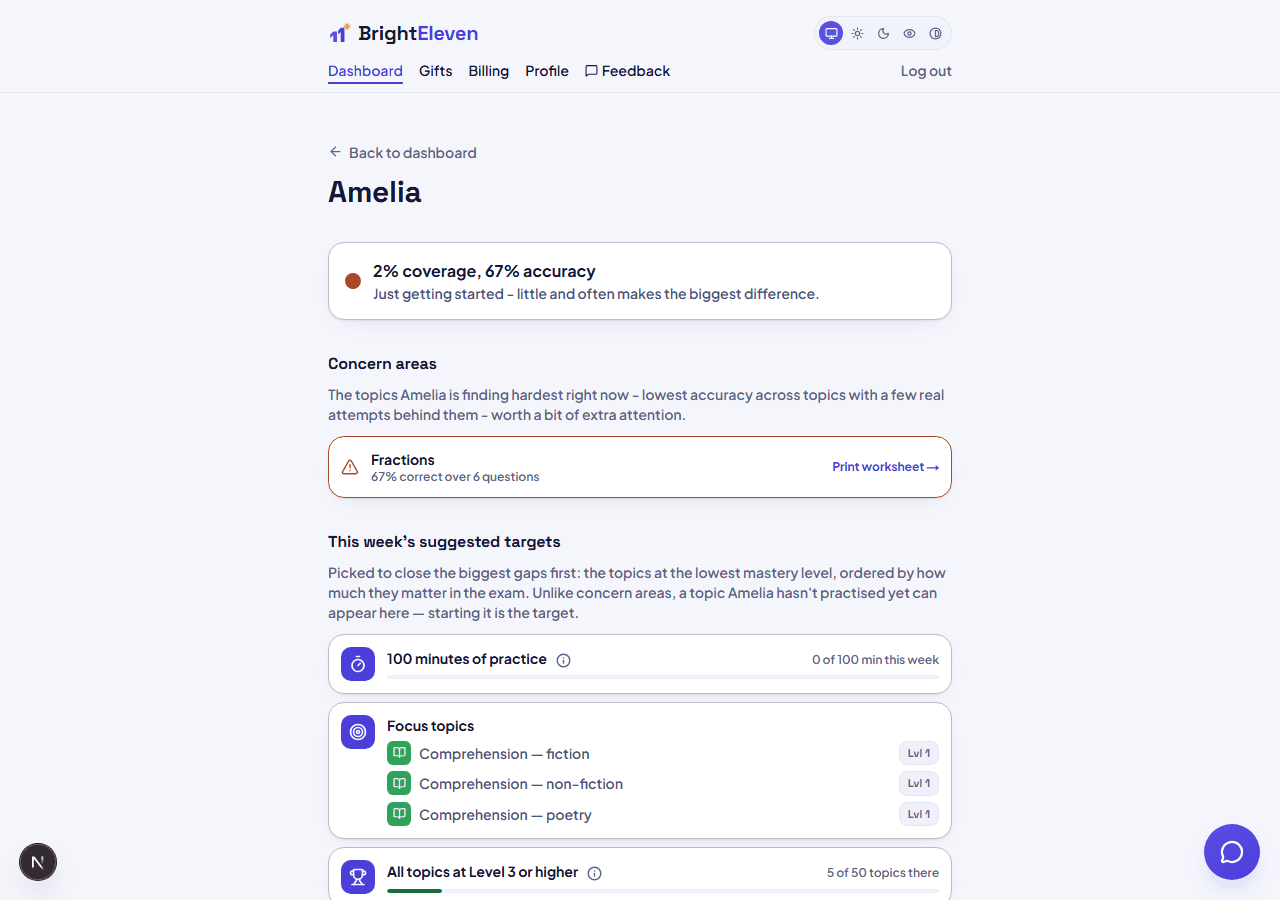
See exactly where they stand, not just that they logged in
Every parent report is built from real attempts, not activity counts. A traffic-light readiness summary, a topic heatmap with a 4-week trend, a misconception fingerprint that spots patterns in wrong answers, and mock exam history - all in one place, and each one links straight to a printable worksheet on the exact topic that needs it.
Don't want to check in manually? Turn on a digest email and get the same picture sent to you daily, weekly, fortnightly, or monthly - your choice.
Everything you get as a parent
Real visibility into progress, not just a login streak - up to 3 children per account.
Weekly targets and exam pacing
Concern areas ranked by lowest accuracy, each linking to a printable worksheet, plus a suggested weekly practice target and an exam pacing plan once you've added an exam date - so a check-in tells you what to focus on next, not just how things went.
Fix-It queue health
See exactly how many tricky questions are currently being retrained and how many have been mastered for good, with a plain-English explainer of the 2/7/21-day re-test schedule.
Topic heatmap
Per-topic accuracy and mastery level across every subject, with a 4-week trend sparkline once there's enough history - each cell links straight to a printable worksheet on that exact topic.
Worksheets
Generate a printable worksheet for any topic in one click - 12 questions plus a separate answer key with explanations, formatted cleanly for printing.
Digest emails
An opt-in progress summary per child, sent daily, weekly, fortnightly or monthly at roughly the time of day you choose - plus a "send now" option whenever you want an update outside the schedule.
Mock exam history
The last 5 results per subject, so you can see the trend, not just the latest score.
Plus full account control at any time: export your data as a PDF report, CSV, or HTML page, or permanently delete your account and every child profile - self-serve, no support ticket needed.
Make it fit your child
Every family is different. These are set once and apply everywhere.
Two PINs, kept separate
Each child has their own 4-digit PIN to open their space. You have a separate Parent PIN that gates the "Parent zone" and sensitive edits like a name change or PIN reset - and you can reset a forgotten child PIN yourself without ever needing the old one, and reset your own Parent PIN with your account password if you forget it.
Daily screen-time limit
Set a daily practice-time cap from 1 to 240 minutes. It blocks the start of a new session once the limit's reached, but never interrupts one already in progress - and it's enforced server-side, so it can't be gamed by leaving a tab open.
Reading fonts built for different needs
Four choices, live-previewed: Classic, Bubbly (just for fun), Easy Read (Lexend, designed to reduce visual crowding), and Super Clear (Atkinson Hyperlegible, designed by the Braille Institute to disambiguate letters like I/l/1 and b/d). Either you or your child can change it.
Larger text, more spacing, calmer visuals
Independent toggles for bigger text, extra line spacing, and turning off confetti/celebration animations app-wide - handy for a child who finds the usual celebrations overstimulating.
Appearance
Light, Dark, Eye comfort, or Greyscale display themes, plus a 4-colour accent picker and a choice of two home-screen layouts (a calm flat grid, or rank cards with tier badges) - all purely cosmetic, never affecting what's available.
Avatar, not a photo
A shape, gradient colour, and an icon from a curated set - deliberately no photo uploads or realistic "characters," as a child-safety choice.
Session length and pacing
Practice sessions default to 10 questions but can be set to 20 or 30. After a correct answer, auto-advance to the next question after a delay you choose (10/20/30 seconds) - it never auto-advances past a wrong answer, so there's always time to read the explanation.
Sound, on your terms
A per-child click-sound toggle that travels with their profile, plus a separate device-wide toggle from your own profile page for shared screens like the login page.
Built to be safe, not just useful
There is no chat feature anywhere in the kid app - nothing your child can type freely, to us or anyone else. Every question passes through a draft → review → live workflow - some content starts AI-assisted, but a human always reviews it before your child ever sees it. Your family's data is isolated from every other family at the database level. High-privacy defaults throughout: we only ever collect a child's first name, avatar choice, and their own learning data - no surname, no date of birth, no year group.
Read the full privacy policy and child privacy notice.
See it for yourself
We're in closed beta - free full access for up to 3 child profiles, until 30 September 2026, no card required.
Get started free